Straightforward Windows system repair tool
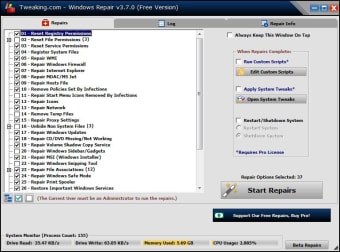
Tweaking.com Windows Repair, developed by Tweaking.com, is a freemium tool designed to simplify common Windows system fixes. It offers a guided interface with preset repair modules covering areas such as file and registry permissions, Windows updates, firewall and network issues, and minor system errors. The step-by-step approach allows both beginners and experienced users to address problems without manually adjusting complex settings. While core functions are free, some advanced utilities are included in the Pro version for broader system maintenance.
Top Recommended Alternative

Guided repairs for accessible troubleshooting
The software provides a structured interface that walks users through essential repair tasks. Preset modules group related repairs, such as fixing permissions, resetting services, addressing Windows update errors, and correcting minor system inconsistencies. This organization reduces complexity, making troubleshooting accessible even for non-technical users. Each repair module includes recommended steps and requires minimal user input, though the program advises creating restore points or backups beforehand to safeguard against potential side effects of permission or registry changes.
Comprehensive yet cautious system optimization
Tweaking.com Windows Repair addresses a wide range of Windows issues, helping to restore system stability and improve performance. The Pro version adds deeper cleaning tools and optional scripts for advanced maintenance. While the program can correct many common problems, it is not a replacement for antivirus software and cannot resolve hardware or third-party software conflicts. Users should follow guidance for safe operation, including using safe mode when advised, to prevent unintended system disruptions during repairs.
Final thoughts
Tweaking.com Windows Repair Free/Pro offers a practical, accessible solution for handling typical Windows issues. Its guided approach, preset repair modules, and Pro-enhanced utilities make system maintenance manageable for a broad audience. While it streamlines troubleshooting, users must remain aware of limitations: it cannot fully remove malware, fix hardware issues, or guarantee all repairs without risk. Following recommended precautions, including backups and restore points, ensures safer and more effective use of the tool for Windows optimization.